


Creating an Agent (TickTockIT)
Creating an AI agent involves more than connecting a language model to a chatbot. A reliable agent needs a clearly defined objective, controlled access to tools and data, a structured decision process, security boundaries, testing, monitoring and human oversight.
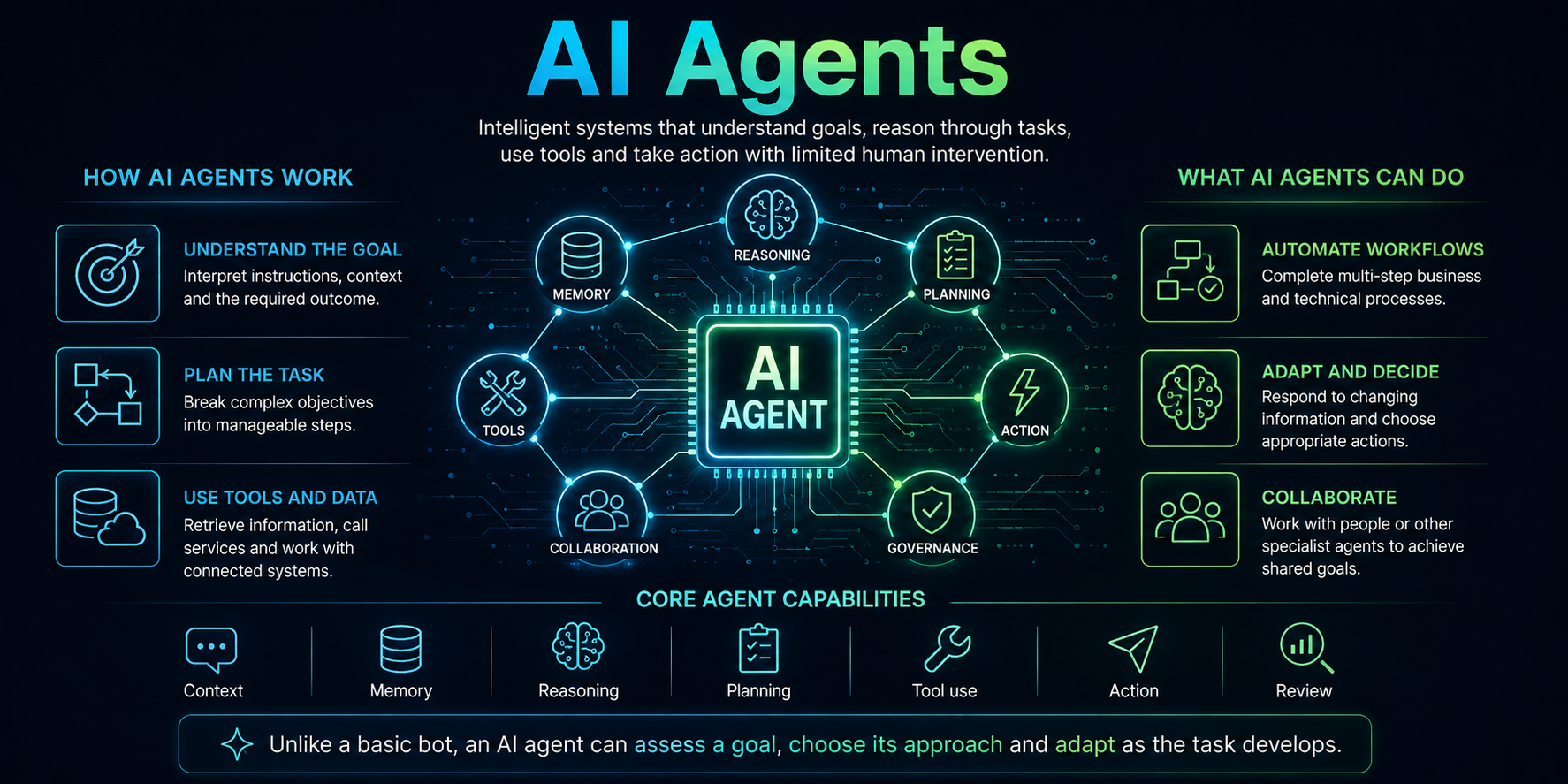
An agent is designed to work towards an outcome. It receives a task, examines the available information, decides what to do, performs one or more actions and checks whether those actions achieved the required result.
The creation process should begin with the business problem rather than the AI technology. The best agent is not the most autonomous one; it is the simplest system that can complete the task safely, consistently and at an acceptable cost.
1. Define the Agent’s Purpose
Start by describing exactly what the agent is expected to achieve. A vague objective such as “help with IT” is too broad to design, secure or test properly.
A stronger definition would be: “Collect diagnostic information for Microsoft 365 sign-in problems, compare it with approved support documentation and prepare a recommended action plan for an engineer to review.”
The purpose should identify the users, expected outcome, permitted actions, excluded actions and conditions that require human intervention.
Questions to Answer
- What problem will the agent solve?
- Who will use it?
- What should a successful result look like?
- Which decisions may the agent make independently?
- Which decisions must remain with a human?
2. Select a Specific Use Case
The first version should focus on one bounded workflow. Trying to create a general-purpose agent at the outset increases cost, uncertainty and security risk.
Suitable initial use cases include classifying support requests, summarising case notes, extracting information from documents, researching approved sources, preparing reports or checking whether required information is missing.
Choose a task that is frequent enough to create value, structured enough to evaluate and low-risk enough to test safely.
3. Map the Existing Human Process
Before automating the work, document how a competent person currently completes it. Record the information they collect, systems they access, decisions they make and checks they perform.
The workflow should include exceptions and failure conditions, not only the ideal path. Real processes contain missing records, conflicting information, inaccessible systems and requests that fall outside normal policy.
This process map becomes the foundation for the agent’s instructions, tools, decision points and test cases.
4. Choose the Required Level of Autonomy
Decide how independently the agent needs to operate. A reactive assistant may only draft a response, while a planning agent may break a goal into steps, select tools and revise its approach.
Use the lowest level of autonomy that can deliver the required result. A system that only needs to retrieve account information should not be allowed to modify the account.
Higher autonomy requires stronger permissions management, monitoring, approval controls, error recovery and accountability.
5. Define Inputs and Outputs
Specify exactly what information the agent will receive and what it must produce. Inputs might include a user request, uploaded document, support ticket, database record, system alert or scheduled event.
Outputs might include a structured report, recommended action, updated record, generated document or request for human approval.
Use a consistent output structure where possible. Structured fields are easier to validate, store, search and pass to other systems than unrestricted text.
6. Choose the AI Model
Select a model based on the actual requirements of the task. Consider reasoning ability, accuracy, context capacity, tool support, response time, cost, privacy and where the model is hosted.
The largest model is not always necessary. A smaller model may handle classification, extraction or routine routing efficiently, while a stronger model is reserved for difficult analysis.
Model choice should be tested against realistic examples rather than based only on published benchmarks or demonstrations.
7. Write the Core Agent Instructions
The agent needs a clear set of operating instructions. These instructions define its role, objective, available information, required workflow, restrictions and escalation rules.
Tell the agent how to handle uncertainty, missing data, conflicting evidence and tool failures. It should never invent missing facts simply to complete a task.
Instructions should also define the required response format and the conditions under which the agent must stop and request human input.
Core Instruction Components
- Role and area of responsibility.
- Primary objective and success criteria.
- Permitted and prohibited actions.
- Required workflow and validation checks.
- Escalation and approval conditions.
- Expected output structure.
8. Provide Relevant Knowledge
An agent needs access to reliable information. This may include policies, product documentation, knowledge-base articles, customer records, service histories or approved websites.
A retrieval system can search the relevant sources and provide only the most useful material to the model for each task. This is commonly called retrieval-augmented generation.
Source material must be current, accurate, appropriately permissioned and clearly separated from untrusted user input.
9. Add Tools and Actions
Tools allow the agent to do more than generate text. A tool might search a database, read a file, call an API, perform a calculation, create a ticket or update an approved business system.
Each tool should have a narrow purpose, clearly defined parameters and predictable results. The agent should not receive unrestricted system or command-line access when a limited function can perform the required action.
Read-only tools should normally be introduced before write tools. Changes to external systems should include validation and, where appropriate, human approval.
10. Design the Agent Workflow
A typical workflow follows a repeating cycle: understand the goal, collect relevant information, decide on the next action, use a tool, inspect the result and determine whether the task is complete.
Set limits on the number of steps, execution time, tool calls and financial cost. Without these limits, an agent may repeat unsuccessful actions or continue working without making useful progress.
The workflow should include a defined completion state, a failure state and an escalation state.
11. Decide How Memory Will Work
Short-term memory keeps relevant information available during the current task. Persistent memory stores information for future tasks, such as user preferences, previous decisions or case history.
Only retain information that has a legitimate purpose. Persistent memory can contain errors, personal data or outdated assumptions and must be treated as a managed data store.
Define what may be remembered, how long it is retained, who can access it and how it can be corrected or deleted.
12. Apply Security and Least Privilege
Create a separate identity for the agent and grant only the permissions required for its role. Do not give it administrator access simply because that is easier during development.
Use short-lived credentials, restricted APIs, action allowlists, isolated execution environments and secure secret storage. Credentials must never be embedded in prompts or source files.
Protect the agent against prompt injection, malicious documents, untrusted websites and instructions that attempt to override its authorised role.
13. Add Human Approval Gates
Identify actions that require approval before execution. These commonly include sending external messages, changing permissions, deleting data, spending money, publishing content or modifying production systems.
The approval screen should clearly show what the agent intends to do, why it selected the action and which data will be affected.
A human approval gate is only useful if the reviewer receives enough information to make an informed decision.
14. Build Error Handling and Recovery
Tools and services will sometimes fail. The agent must recognise timeouts, invalid responses, missing permissions and partial completion.
Define whether an action may be retried, how many retries are permitted and when the task must be escalated. Repeating the same failed action indefinitely is not recovery.
Where the agent makes changes, use reversible operations and record the previous state so that changes can be rolled back when practical.
15. Create a Test Dataset
Build a collection of realistic tasks with known acceptable outcomes. Include straightforward cases, ambiguous requests, incomplete information, unusual inputs and deliberate attempts to bypass restrictions.
Do not test only with examples used while writing the instructions. Separate evaluation cases are needed to determine whether the agent works beyond the development examples.
The test set should be expanded whenever a new failure occurs in development or production.
16. Test the Agent’s Behaviour
Evaluate accuracy, task completion, tool selection, adherence to policy, security, response time and cost. Check whether the agent knows when to ask for help rather than guessing.
Test each tool independently and then test complete workflows. Simulate unavailable services, revoked permissions, malformed data and interrupted operations.
High-risk agents should be tested in an isolated environment using non-production data before they receive access to live systems.
17. Measure Useful Outcomes
Measure the agent by the value and reliability of its completed work, not by how natural or confident its responses sound.
Useful measures include successful completion rate, factual accuracy, human correction rate, escalation rate, average processing time, tool failures and cost per completed task.
Security incidents and high-impact errors must be tracked separately because a good average score can conceal unacceptable individual failures.
18. Introduce the Agent Gradually
Begin with a restricted pilot. Allow the agent to observe work or prepare recommendations before permitting it to take direct action.
Expand access in stages as evidence of reliability accumulates. Start with a small user group, limited data and low-risk tools.
Users should understand what the agent can do, what it cannot do and how to report an incorrect or unsafe result.
19. Monitor Production Activity
Record prompts, decisions, tool calls, approvals, outputs, errors and execution costs in an appropriate audit log. Sensitive information should be protected or removed where it is not needed.
Monitoring should detect unusual behaviour, repeated failures, unexpected tool usage, excessive cost and changes in performance over time.
Provide a reliable method to pause the agent, revoke its credentials and disable individual tools immediately.
20. Maintain and Improve the Agent
An agent is not finished when it is deployed. Models, APIs, documents, policies and business processes change, and these changes can alter its behaviour.
Review instructions, tools, permissions and knowledge sources regularly. Retest the system after model changes, software updates or modifications to connected services.
Use real performance data and reviewed failures to improve the workflow, but do not allow the agent to change its own permissions or core safety rules without controlled approval.
A Practical Agent Architecture
A production agent normally contains several separate components: a user or system trigger, an orchestration layer, an AI model, approved knowledge sources, controlled tools, memory, policy checks, human approval and monitoring.
Separating these components makes the system easier to secure, test and maintain. The model should not be treated as the complete application.
Deterministic software should handle permissions, validation, calculations and critical rules. AI reasoning should be used where interpretation, planning or flexible decision-making is genuinely required.
Example: Creating an IT Support Agent
An IT support agent could receive a ticket, identify the affected service, collect relevant device and account information, search approved documentation and prepare a diagnostic plan.
Read-only access could allow it to inspect system status and configuration. Any password reset, account change, software deployment or security modification would require explicit approval.
The agent’s success would be measured by correct diagnosis, useful recommendations, reduced handling time and a low rate of inappropriate actions—not simply by the number of tickets it processes.
Common Design Mistakes
- Starting with a vague or unlimited objective.
- Giving the agent excessive access during development.
- Relying on prompts instead of enforcing permissions in software.
- Using outdated or unverified knowledge sources.
- Failing to test exceptions and malicious inputs.
- Allowing unlimited loops, tool calls or expenditure.
- Deploying without logs, monitoring or a shutdown mechanism.
- Measuring impressive responses instead of correct outcomes.
Final Thoughts
Creating an agent is a software-engineering, security and process-design project. The AI model is important, but it is only one component of the finished system.
A dependable agent begins with a narrow objective, receives only the tools and information it needs, operates within enforced boundaries and requests human approval for consequential actions.
Build the simplest useful version, test it against realistic failures and increase autonomy only when its performance justifies the additional risk. That approach produces agents that are useful, maintainable and fit for real business use.