



Professional Backup Tools and Strategies (TickTockIT)

A professional backup strategy protects a business against data loss caused by hardware failure, human error, software corruption, theft, natural disaster, and ransomware. It combines the right tools, a clear schedule, tested recovery procedures, and enough redundancy that no single failure can destroy the only copy of important data.

Backups are often treated as a background task until the moment they are needed. At that point, the difference between a business that recovers within hours and one that loses days of work, revenue, and customer trust usually comes down to decisions made long before the incident occurred.

This page outlines the core concepts, common tools, and practical strategies that make up a dependable professional backup approach.


Why Backup Strategy Matters More Than Backup Software

Purchasing backup software is not the same as having a backup strategy. Software is only one component. A strategy also defines what gets backed up, how often, where copies are stored, how long they are retained, who is responsible for monitoring them, and how a restore is actually carried out.

Many data-loss incidents are not caused by the absence of backup software, but by backups that silently failed, were misconfigured, or were never tested. A strategy exists to catch these failures before they matter.

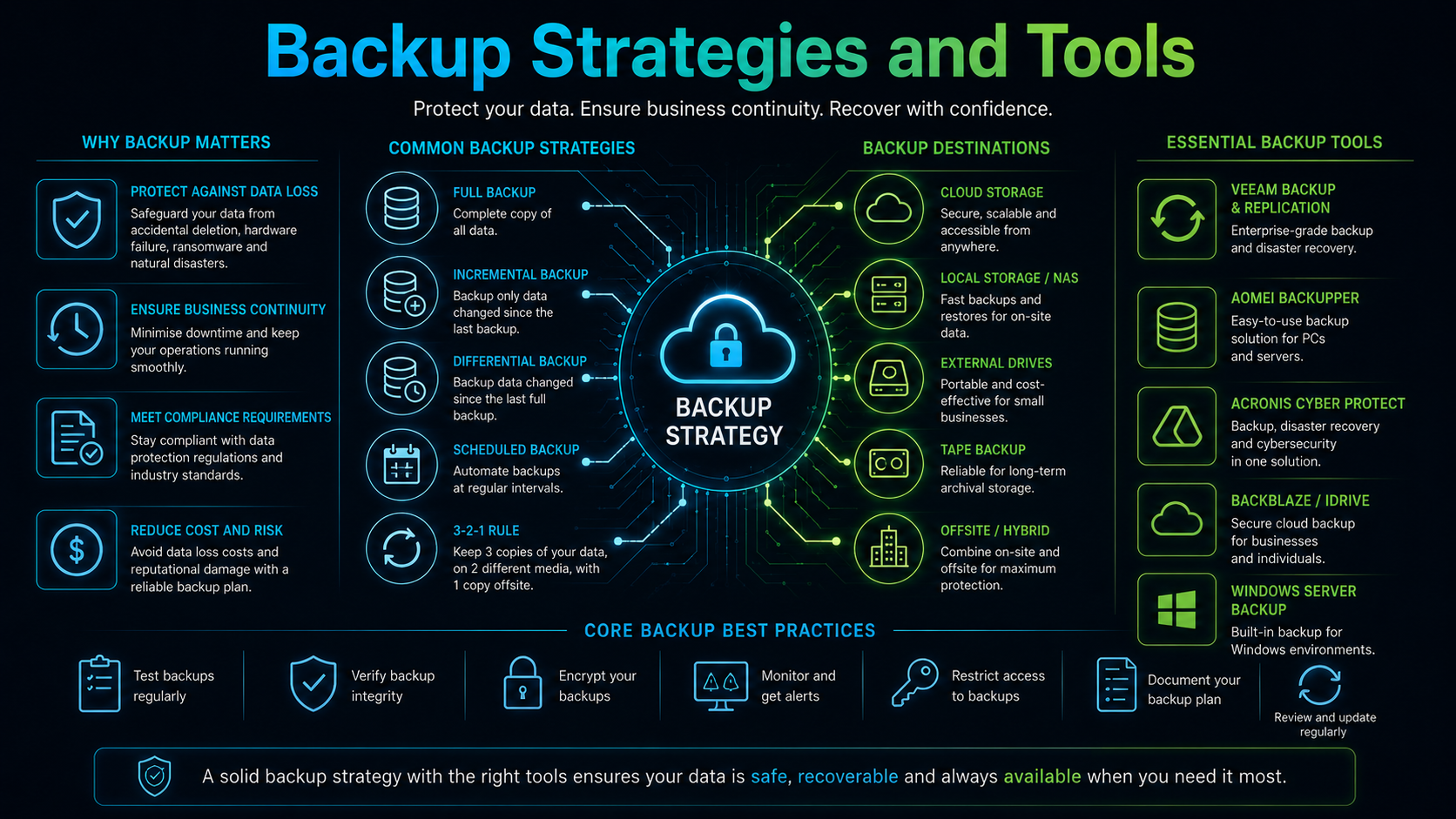
The 3-2-1 Backup Rule

The 3-2-1 rule is a widely used baseline for backup design. It states that an organisation should keep:

  • At least three copies of important data.
  • Stored on at least two different types of media or systems.
  • With at least one copy kept off-site or offline.

This structure protects against multiple failure modes at once. A local disk failure does not destroy the off-site copy. A site-wide event such as fire, flood, or theft does not destroy the local copy. A ransomware infection that spreads across a network is less likely to reach a copy that is offline or air-gapped.

Many organisations now extend this to a 3-2-1-1 or 3-2-1-1-0 model, adding an immutable or offline copy and a requirement that restores be regularly tested with zero errors.

Types of Backup

Understanding backup types helps balance storage cost against recovery speed.

Full Backup

A full backup copies the entire dataset every time it runs. It is the simplest to restore from because everything needed is in one place, but it consumes the most storage and takes the longest to complete.

Incremental Backup

An incremental backup only copies data that has changed since the last backup of any kind. It is fast and storage-efficient, but a restore requires the last full backup plus every incremental backup since, which increases restore time and complexity.

Differential Backup

A differential backup copies all data that has changed since the last full backup. It uses more storage than incremental backups but simplifies restoration, since only the last full backup and the most recent differential are required.

Synthetic Full Backup

A synthetic full backup combines a previous full backup with subsequent incremental backups to create a new full backup, without re-reading all data from the original source. This reduces load on production systems while still producing a fast, single-point restore.

Image-Based vs File-Based Backup

File-based backup copies individual files and folders, which is useful for document repositories, user data, and selective restores.

Image-based backup captures an entire disk or virtual machine, including the operating system, applications, and configuration. This allows a complete system to be restored or spun up quickly after failure, which is especially valuable for servers where reinstalling and reconfiguring software manually would take far longer than restoring an image.

On-Site, Off-Site, and Cloud Backup

A resilient strategy typically combines more than one storage location.

On-site backup, such as a network-attached storage device or a dedicated backup server, provides fast restore speeds because data does not need to travel over the internet. However, it is vulnerable to local disasters, theft, and any threat that compromises the local network.

Off-site backup, whether a secondary location, a rotated physical drive, or a cloud provider, protects against site-wide loss. Cloud backup in particular has become a standard component of professional strategies because it is scalable, accessible from anywhere, and typically includes its own redundancy across multiple facilities.

The trade-off is restore time: recovering a large dataset from the cloud after a major failure can take considerably longer than restoring from a local copy, which is why many organisations keep both.

Categories of Backup Tools

Professional backup tools generally fall into a few categories, and larger environments often use more than one together.

  • Server and virtualisation backup platforms — designed to back up physical servers, Hyper-V, and VMware environments, often with image-based snapshots and application-aware processing for databases and mail servers.
  • Endpoint and workstation backup tools — protect individual laptops and desktops, often with continuous or scheduled file-level backup and centralised management.
  • Cloud-to-cloud backup tools — back up data held in SaaS platforms such as Microsoft 365 and Google Workspace, which is not automatically protected against accidental deletion or malicious activity by the platform vendor’s own retention settings.
  • Native operating system tools — built-in utilities that provide basic scheduled backup and image creation, useful as a baseline but often limited in reporting, retention flexibility, and enterprise features.
  • NAS and storage-appliance backup features — snapshot and replication capabilities built into network storage devices, useful for fast local recovery and site-to-site replication.

Selecting tools should be driven by what needs protecting, not by a single product’s feature list. A file server, a database, a fleet of laptops, and a Microsoft 365 tenant often have different backup requirements and may need different tools working together.

Backing Up Microsoft 365 and Cloud SaaS Data

A common misunderstanding is assuming that data stored in Microsoft 365, Google Workspace, or similar platforms is automatically backed up by the vendor. In most cases, the vendor is responsible for platform availability, not for protecting the organisation from accidental deletion, retention-policy gaps, insider threats, or malicious mailbox and file deletion.

A dedicated cloud-to-cloud backup tool captures mailboxes, calendars, contacts, Teams data, and files such as SharePoint and OneDrive content on an independent schedule, with its own retention separate from the platform’s native recycle bin or retention policy.

Backup Scheduling and Automation

Manual backups are unreliable because they depend on someone remembering to run them. Professional strategies automate backups on a defined schedule appropriate to how quickly data changes and how much loss the business can tolerate.

Two figures guide this scheduling:

  • Recovery Point Objective (RPO) — the maximum acceptable amount of data loss, measured in time. An RPO of one hour means backups must run at least hourly.
  • Recovery Time Objective (RTO) — the maximum acceptable time to restore service after a failure. A short RTO usually requires image-based backups, local copies, or standby systems rather than relying solely on a slow off-site restore.

Automated backup jobs should include alerting so that failures are reported immediately rather than discovered during an actual emergency.

Retention Policies

Retention policy defines how long backup copies are kept and how many historical versions are available. Keeping only the most recent backup provides no protection against corruption or ransomware that has gone unnoticed for several days, since the infected version simply overwrites the clean one.

A layered retention approach — for example, keeping daily backups for two weeks, weekly backups for two months, and monthly backups for a year — allows recovery from a much wider range of scenarios, including slow-developing issues that are not noticed immediately.

Encryption and Access Control

Backup data is often as sensitive as the live data it protects, sometimes more so, because a single backup archive can contain a complete copy of financial records, customer information, or credentials.

Backups should be encrypted both in transit and at rest. Access to backup systems, consoles, and storage should be restricted to the people who genuinely need it, protected with multi-factor authentication, and separated from standard user accounts wherever possible.

Ransomware and Immutable Backups

Modern ransomware frequently targets backup systems directly, attempting to delete or encrypt backup copies before encrypting production data, in order to remove the victim’s ability to recover without paying a ransom.

Immutable backups address this by making stored backup data unable to be altered or deleted for a defined retention period, even by an administrator account, until that period expires. Combined with offline or air-gapped copies, this significantly reduces the chance that an attacker can destroy every available backup.

Testing Restores

A backup that has never been restored is unverified. Corrupted archives, incomplete jobs, missing databases, and configuration errors are common, and they are often invisible until a restore is actually attempted.

Professional strategies include scheduled restore testing: recovering a sample file, a full server image, or an entire system into an isolated environment to confirm that the backup is complete, intact, and usable within the required recovery time.

Testing should also confirm that restored systems actually function correctly, not just that files were copied successfully.

Monitoring, Reporting, and Alerts

Backup systems should produce clear reporting on job success, failure, duration, and storage consumption. Silent failures are one of the most common causes of unrecoverable data loss, because the absence of a working backup is only discovered when it is needed.

Alerts should be routed to someone who will act on them, and repeated failures should trigger escalation rather than being repeatedly dismissed or ignored.

Documentation and Disaster Recovery Planning

Backup tools alone do not constitute a disaster recovery plan. A documented plan should describe what systems exist, what depends on what, who is responsible for recovery, what order systems should be restored in, and how long each step is expected to take.

This documentation should be stored somewhere accessible even if the primary systems are down, and it should be reviewed whenever infrastructure changes significantly.

Common Backup Mistakes

  • Assuming cloud platforms back up themselves automatically.
  • Keeping only one copy, or copies that are all on the same network.
  • Never testing a restore until an actual emergency occurs.
  • Ignoring backup failure alerts over time.
  • Storing backup credentials using the same accounts as daily administration.
  • Retaining only the most recent backup, with no historical versions.
  • Leaving backup storage connected and writable at all times, exposing it to ransomware.
  • Failing to document recovery steps, leaving knowledge in one person’s head.

Choosing a Strategy for the Size of the Business

A small business with a handful of workstations and a cloud email platform may only need endpoint backup software, a cloud-to-cloud backup tool for email and files, and a simple offline or off-site copy of critical archives.

A growing business running on-premises servers, a database, and a mix of cloud services typically needs image-based server backup, application-aware handling for databases, cloud-to-cloud protection for SaaS platforms, and a tested disaster recovery plan with defined RPO and RTO targets.

Larger or regulated organisations often add immutable storage, offsite replication to a secondary data centre, formal retention schedules aligned with compliance requirements, and regular third-party review of backup and recovery procedures.

Compliance and Regulatory Considerations

Certain industries and data types carry specific retention and protection requirements, covering how long records must be kept, how they must be secured, and how quickly they must be recoverable.

Backup strategy should be designed with these requirements in mind from the start, since retrofitting compliance into an existing backup system is usually more disruptive than building it in from the beginning.

Final Thoughts

A professional backup strategy is not a single product but a combination of the right tools, a clear schedule, sufficient redundancy across locations and media, strong access controls, and regular restore testing.

The value of a backup is only proven at the moment of recovery. Strategies built around the 3-2-1 rule, automated monitoring, immutable or offline copies, and documented recovery procedures give a business the best chance of a fast, complete recovery when something goes wrong.

Backup software provides the mechanism, but discipline, testing, and planning are what actually determine whether data can be recovered when it matters most.


Digital cloud technology and city skyline


Professional Backup Tools and Strategies (TickTockIT)

A professional backup strategy protects a business against data loss caused by hardware failure, human error, software corruption, theft, natural disaster, and ransomware. It combines the right tools, a clear schedule, tested recovery procedures, and enough redundancy that no single failure can destroy the only copy of important data.

Backups are often treated as a background task until the moment they are needed. At that point, the difference between a business that recovers within hours and one that loses days of work, revenue, and customer trust usually comes down to decisions made long before the incident occurred.

This page outlines the core concepts, common tools, and practical strategies that make up a dependable professional backup approach.


Why Backup Strategy Matters More Than Backup Software

Purchasing backup software is not the same as having a backup strategy. Software is only one component. A strategy also defines what gets backed up, how often, where copies are stored, how long they are retained, who is responsible for monitoring them, and how a restore is actually carried out.

Many data-loss incidents are not caused by the absence of backup software, but by backups that silently failed, were misconfigured, or were never tested. A strategy exists to catch these failures before they matter.

The 3-2-1 Backup Rule

The 3-2-1 rule is a widely used baseline for backup design. It states that an organisation should keep:

This structure protects against multiple failure modes at once. A local disk failure does not destroy the off-site copy. A site-wide event such as fire, flood, or theft does not destroy the local copy. A ransomware infection that spreads across a network is less likely to reach a copy that is offline or air-gapped.

Many organisations now extend this to a 3-2-1-1 or 3-2-1-1-0 model, adding an immutable or offline copy and a requirement that restores be regularly tested with zero errors.

Types of Backup

Understanding backup types helps balance storage cost against recovery speed.

Full Backup

A full backup copies the entire dataset every time it runs. It is the simplest to restore from because everything needed is in one place, but it consumes the most storage and takes the longest to complete.

Incremental Backup

An incremental backup only copies data that has changed since the last backup of any kind. It is fast and storage-efficient, but a restore requires the last full backup plus every incremental backup since, which increases restore time and complexity.

Differential Backup

A differential backup copies all data that has changed since the last full backup. It uses more storage than incremental backups but simplifies restoration, since only the last full backup and the most recent differential are required.

Synthetic Full Backup

A synthetic full backup combines a previous full backup with subsequent incremental backups to create a new full backup, without re-reading all data from the original source. This reduces load on production systems while still producing a fast, single-point restore.

Image-Based vs File-Based Backup

File-based backup copies individual files and folders, which is useful for document repositories, user data, and selective restores.

Image-based backup captures an entire disk or virtual machine, including the operating system, applications, and configuration. This allows a complete system to be restored or spun up quickly after failure, which is especially valuable for servers where reinstalling and reconfiguring software manually would take far longer than restoring an image.

On-Site, Off-Site, and Cloud Backup

A resilient strategy typically combines more than one storage location.

On-site backup, such as a network-attached storage device or a dedicated backup server, provides fast restore speeds because data does not need to travel over the internet. However, it is vulnerable to local disasters, theft, and any threat that compromises the local network.

Off-site backup, whether a secondary location, a rotated physical drive, or a cloud provider, protects against site-wide loss. Cloud backup in particular has become a standard component of professional strategies because it is scalable, accessible from anywhere, and typically includes its own redundancy across multiple facilities.

The trade-off is restore time: recovering a large dataset from the cloud after a major failure can take considerably longer than restoring from a local copy, which is why many organisations keep both.

Categories of Backup Tools

Professional backup tools generally fall into a few categories, and larger environments often use more than one together.

Selecting tools should be driven by what needs protecting, not by a single product’s feature list. A file server, a database, a fleet of laptops, and a Microsoft 365 tenant often have different backup requirements and may need different tools working together.

Backing Up Microsoft 365 and Cloud SaaS Data

A common misunderstanding is assuming that data stored in Microsoft 365, Google Workspace, or similar platforms is automatically backed up by the vendor. In most cases, the vendor is responsible for platform availability, not for protecting the organisation from accidental deletion, retention-policy gaps, insider threats, or malicious mailbox and file deletion.

A dedicated cloud-to-cloud backup tool captures mailboxes, calendars, contacts, Teams data, and files such as SharePoint and OneDrive content on an independent schedule, with its own retention separate from the platform’s native recycle bin or retention policy.

Backup Scheduling and Automation

Manual backups are unreliable because they depend on someone remembering to run them. Professional strategies automate backups on a defined schedule appropriate to how quickly data changes and how much loss the business can tolerate.

Two figures guide this scheduling:

Automated backup jobs should include alerting so that failures are reported immediately rather than discovered during an actual emergency.

Retention Policies

Retention policy defines how long backup copies are kept and how many historical versions are available. Keeping only the most recent backup provides no protection against corruption or ransomware that has gone unnoticed for several days, since the infected version simply overwrites the clean one.

A layered retention approach — for example, keeping daily backups for two weeks, weekly backups for two months, and monthly backups for a year — allows recovery from a much wider range of scenarios, including slow-developing issues that are not noticed immediately.

Encryption and Access Control

Backup data is often as sensitive as the live data it protects, sometimes more so, because a single backup archive can contain a complete copy of financial records, customer information, or credentials.

Backups should be encrypted both in transit and at rest. Access to backup systems, consoles, and storage should be restricted to the people who genuinely need it, protected with multi-factor authentication, and separated from standard user accounts wherever possible.

Ransomware and Immutable Backups

Modern ransomware frequently targets backup systems directly, attempting to delete or encrypt backup copies before encrypting production data, in order to remove the victim’s ability to recover without paying a ransom.

Immutable backups address this by making stored backup data unable to be altered or deleted for a defined retention period, even by an administrator account, until that period expires. Combined with offline or air-gapped copies, this significantly reduces the chance that an attacker can destroy every available backup.

Testing Restores

A backup that has never been restored is unverified. Corrupted archives, incomplete jobs, missing databases, and configuration errors are common, and they are often invisible until a restore is actually attempted.

Professional strategies include scheduled restore testing: recovering a sample file, a full server image, or an entire system into an isolated environment to confirm that the backup is complete, intact, and usable within the required recovery time.

Testing should also confirm that restored systems actually function correctly, not just that files were copied successfully.

Monitoring, Reporting, and Alerts

Backup systems should produce clear reporting on job success, failure, duration, and storage consumption. Silent failures are one of the most common causes of unrecoverable data loss, because the absence of a working backup is only discovered when it is needed.

Alerts should be routed to someone who will act on them, and repeated failures should trigger escalation rather than being repeatedly dismissed or ignored.

Documentation and Disaster Recovery Planning

Backup tools alone do not constitute a disaster recovery plan. A documented plan should describe what systems exist, what depends on what, who is responsible for recovery, what order systems should be restored in, and how long each step is expected to take.

This documentation should be stored somewhere accessible even if the primary systems are down, and it should be reviewed whenever infrastructure changes significantly.

Common Backup Mistakes

Choosing a Strategy for the Size of the Business

A small business with a handful of workstations and a cloud email platform may only need endpoint backup software, a cloud-to-cloud backup tool for email and files, and a simple offline or off-site copy of critical archives.

A growing business running on-premises servers, a database, and a mix of cloud services typically needs image-based server backup, application-aware handling for databases, cloud-to-cloud protection for SaaS platforms, and a tested disaster recovery plan with defined RPO and RTO targets.

Larger or regulated organisations often add immutable storage, offsite replication to a secondary data centre, formal retention schedules aligned with compliance requirements, and regular third-party review of backup and recovery procedures.

Compliance and Regulatory Considerations

Certain industries and data types carry specific retention and protection requirements, covering how long records must be kept, how they must be secured, and how quickly they must be recoverable.

Backup strategy should be designed with these requirements in mind from the start, since retrofitting compliance into an existing backup system is usually more disruptive than building it in from the beginning.

Final Thoughts

A professional backup strategy is not a single product but a combination of the right tools, a clear schedule, sufficient redundancy across locations and media, strong access controls, and regular restore testing.

The value of a backup is only proven at the moment of recovery. Strategies built around the 3-2-1 rule, automated monitoring, immutable or offline copies, and documented recovery procedures give a business the best chance of a fast, complete recovery when something goes wrong.

Backup software provides the mechanism, but discipline, testing, and planning are what actually determine whether data can be recovered when it matters most.


Digital cloud technology and city skyline


Professional Backup Tools and Strategies (TickTockIT)

A professional backup strategy protects a business against data loss caused by hardware failure, human error, software corruption, theft, natural disaster, and ransomware. It combines the right tools, a clear schedule, tested recovery procedures, and enough redundancy that no single failure can destroy the only copy of important data.

Backups are often treated as a background task until the moment they are needed. At that point, the difference between a business that recovers within hours and one that loses days of work, revenue, and customer trust usually comes down to decisions made long before the incident occurred.

This page outlines the core concepts, common tools, and practical strategies that make up a dependable professional backup approach.


Why Backup Strategy Matters More Than Backup Software

Purchasing backup software is not the same as having a backup strategy. Software is only one component. A strategy also defines what gets backed up, how often, where copies are stored, how long they are retained, who is responsible for monitoring them, and how a restore is actually carried out.

Many data-loss incidents are not caused by the absence of backup software, but by backups that silently failed, were misconfigured, or were never tested. A strategy exists to catch these failures before they matter.

The 3-2-1 Backup Rule

The 3-2-1 rule is a widely used baseline for backup design. It states that an organisation should keep:

  • At least three copies of important data.
  • Stored on at least two different types of media or systems.
  • With at least one copy kept off-site or offline.

This structure protects against multiple failure modes at once. A local disk failure does not destroy the off-site copy. A site-wide event such as fire, flood, or theft does not destroy the local copy. A ransomware infection that spreads across a network is less likely to reach a copy that is offline or air-gapped.

Many organisations now extend this to a 3-2-1-1 or 3-2-1-1-0 model, adding an immutable or offline copy and a requirement that restores be regularly tested with zero errors.

Types of Backup

Understanding backup types helps balance storage cost against recovery speed.

Full Backup

A full backup copies the entire dataset every time it runs. It is the simplest to restore from because everything needed is in one place, but it consumes the most storage and takes the longest to complete.

Incremental Backup

An incremental backup only copies data that has changed since the last backup of any kind. It is fast and storage-efficient, but a restore requires the last full backup plus every incremental backup since, which increases restore time and complexity.

Differential Backup

A differential backup copies all data that has changed since the last full backup. It uses more storage than incremental backups but simplifies restoration, since only the last full backup and the most recent differential are required.

Synthetic Full Backup

A synthetic full backup combines a previous full backup with subsequent incremental backups to create a new full backup, without re-reading all data from the original source. This reduces load on production systems while still producing a fast, single-point restore.

Image-Based vs File-Based Backup

File-based backup copies individual files and folders, which is useful for document repositories, user data, and selective restores.

Image-based backup captures an entire disk or virtual machine, including the operating system, applications, and configuration. This allows a complete system to be restored or spun up quickly after failure, which is especially valuable for servers where reinstalling and reconfiguring software manually would take far longer than restoring an image.

On-Site, Off-Site, and Cloud Backup

A resilient strategy typically combines more than one storage location.

On-site backup, such as a network-attached storage device or a dedicated backup server, provides fast restore speeds because data does not need to travel over the internet. However, it is vulnerable to local disasters, theft, and any threat that compromises the local network.

Off-site backup, whether a secondary location, a rotated physical drive, or a cloud provider, protects against site-wide loss. Cloud backup in particular has become a standard component of professional strategies because it is scalable, accessible from anywhere, and typically includes its own redundancy across multiple facilities.

The trade-off is restore time: recovering a large dataset from the cloud after a major failure can take considerably longer than restoring from a local copy, which is why many organisations keep both.

Categories of Backup Tools

Professional backup tools generally fall into a few categories, and larger environments often use more than one together.

  • Server and virtualisation backup platforms — designed to back up physical servers, Hyper-V, and VMware environments, often with image-based snapshots and application-aware processing for databases and mail servers.
  • Endpoint and workstation backup tools — protect individual laptops and desktops, often with continuous or scheduled file-level backup and centralised management.
  • Cloud-to-cloud backup tools — back up data held in SaaS platforms such as Microsoft 365 and Google Workspace, which is not automatically protected against accidental deletion or malicious activity by the platform vendor’s own retention settings.
  • Native operating system tools — built-in utilities that provide basic scheduled backup and image creation, useful as a baseline but often limited in reporting, retention flexibility, and enterprise features.
  • NAS and storage-appliance backup features — snapshot and replication capabilities built into network storage devices, useful for fast local recovery and site-to-site replication.

Selecting tools should be driven by what needs protecting, not by a single product’s feature list. A file server, a database, a fleet of laptops, and a Microsoft 365 tenant often have different backup requirements and may need different tools working together.

Backing Up Microsoft 365 and Cloud SaaS Data

A common misunderstanding is assuming that data stored in Microsoft 365, Google Workspace, or similar platforms is automatically backed up by the vendor. In most cases, the vendor is responsible for platform availability, not for protecting the organisation from accidental deletion, retention-policy gaps, insider threats, or malicious mailbox and file deletion.

A dedicated cloud-to-cloud backup tool captures mailboxes, calendars, contacts, Teams data, and files such as SharePoint and OneDrive content on an independent schedule, with its own retention separate from the platform’s native recycle bin or retention policy.

Backup Scheduling and Automation

Manual backups are unreliable because they depend on someone remembering to run them. Professional strategies automate backups on a defined schedule appropriate to how quickly data changes and how much loss the business can tolerate.

Two figures guide this scheduling:

  • Recovery Point Objective (RPO) — the maximum acceptable amount of data loss, measured in time. An RPO of one hour means backups must run at least hourly.
  • Recovery Time Objective (RTO) — the maximum acceptable time to restore service after a failure. A short RTO usually requires image-based backups, local copies, or standby systems rather than relying solely on a slow off-site restore.

Automated backup jobs should include alerting so that failures are reported immediately rather than discovered during an actual emergency.

Retention Policies

Retention policy defines how long backup copies are kept and how many historical versions are available. Keeping only the most recent backup provides no protection against corruption or ransomware that has gone unnoticed for several days, since the infected version simply overwrites the clean one.

A layered retention approach — for example, keeping daily backups for two weeks, weekly backups for two months, and monthly backups for a year — allows recovery from a much wider range of scenarios, including slow-developing issues that are not noticed immediately.

Encryption and Access Control

Backup data is often as sensitive as the live data it protects, sometimes more so, because a single backup archive can contain a complete copy of financial records, customer information, or credentials.

Backups should be encrypted both in transit and at rest. Access to backup systems, consoles, and storage should be restricted to the people who genuinely need it, protected with multi-factor authentication, and separated from standard user accounts wherever possible.

Ransomware and Immutable Backups

Modern ransomware frequently targets backup systems directly, attempting to delete or encrypt backup copies before encrypting production data, in order to remove the victim’s ability to recover without paying a ransom.

Immutable backups address this by making stored backup data unable to be altered or deleted for a defined retention period, even by an administrator account, until that period expires. Combined with offline or air-gapped copies, this significantly reduces the chance that an attacker can destroy every available backup.

Testing Restores

A backup that has never been restored is unverified. Corrupted archives, incomplete jobs, missing databases, and configuration errors are common, and they are often invisible until a restore is actually attempted.

Professional strategies include scheduled restore testing: recovering a sample file, a full server image, or an entire system into an isolated environment to confirm that the backup is complete, intact, and usable within the required recovery time.

Testing should also confirm that restored systems actually function correctly, not just that files were copied successfully.

Monitoring, Reporting, and Alerts

Backup systems should produce clear reporting on job success, failure, duration, and storage consumption. Silent failures are one of the most common causes of unrecoverable data loss, because the absence of a working backup is only discovered when it is needed.

Alerts should be routed to someone who will act on them, and repeated failures should trigger escalation rather than being repeatedly dismissed or ignored.

Documentation and Disaster Recovery Planning

Backup tools alone do not constitute a disaster recovery plan. A documented plan should describe what systems exist, what depends on what, who is responsible for recovery, what order systems should be restored in, and how long each step is expected to take.

This documentation should be stored somewhere accessible even if the primary systems are down, and it should be reviewed whenever infrastructure changes significantly.

Common Backup Mistakes

  • Assuming cloud platforms back up themselves automatically.
  • Keeping only one copy, or copies that are all on the same network.
  • Never testing a restore until an actual emergency occurs.
  • Ignoring backup failure alerts over time.
  • Storing backup credentials using the same accounts as daily administration.
  • Retaining only the most recent backup, with no historical versions.
  • Leaving backup storage connected and writable at all times, exposing it to ransomware.
  • Failing to document recovery steps, leaving knowledge in one person’s head.

Choosing a Strategy for the Size of the Business

A small business with a handful of workstations and a cloud email platform may only need endpoint backup software, a cloud-to-cloud backup tool for email and files, and a simple offline or off-site copy of critical archives.

A growing business running on-premises servers, a database, and a mix of cloud services typically needs image-based server backup, application-aware handling for databases, cloud-to-cloud protection for SaaS platforms, and a tested disaster recovery plan with defined RPO and RTO targets.

Larger or regulated organisations often add immutable storage, offsite replication to a secondary data centre, formal retention schedules aligned with compliance requirements, and regular third-party review of backup and recovery procedures.

Compliance and Regulatory Considerations

Certain industries and data types carry specific retention and protection requirements, covering how long records must be kept, how they must be secured, and how quickly they must be recoverable.

Backup strategy should be designed with these requirements in mind from the start, since retrofitting compliance into an existing backup system is usually more disruptive than building it in from the beginning.

Final Thoughts

A professional backup strategy is not a single product but a combination of the right tools, a clear schedule, sufficient redundancy across locations and media, strong access controls, and regular restore testing.

The value of a backup is only proven at the moment of recovery. Strategies built around the 3-2-1 rule, automated monitoring, immutable or offline copies, and documented recovery procedures give a business the best chance of a fast, complete recovery when something goes wrong.

Backup software provides the mechanism, but discipline, testing, and planning are what actually determine whether data can be recovered when it matters most.


Professional Backup Tools and Strategies (TickTockIT)

A professional backup strategy protects a business against data loss caused by hardware failure, human error, software corruption, theft, natural disaster, and ransomware. It combines the right tools, a clear schedule, tested recovery procedures, and enough redundancy that no single failure can destroy the only copy of important data.

Backups are often treated as a background task until the moment they are needed. At that point, the difference between a business that recovers within hours and one that loses days of work, revenue, and customer trust usually comes down to decisions made long before the incident occurred.

This page outlines the core concepts, common tools, and practical strategies that make up a dependable professional backup approach.


Why Backup Strategy Matters More Than Backup Software

Purchasing backup software is not the same as having a backup strategy. Software is only one component. A strategy also defines what gets backed up, how often, where copies are stored, how long they are retained, who is responsible for monitoring them, and how a restore is actually carried out.

Many data-loss incidents are not caused by the absence of backup software, but by backups that silently failed, were misconfigured, or were never tested. A strategy exists to catch these failures before they matter.

The 3-2-1 Backup Rule

The 3-2-1 rule is a widely used baseline for backup design. It states that an organisation should keep:

This structure protects against multiple failure modes at once. A local disk failure does not destroy the off-site copy. A site-wide event such as fire, flood, or theft does not destroy the local copy. A ransomware infection that spreads across a network is less likely to reach a copy that is offline or air-gapped.

Many organisations now extend this to a 3-2-1-1 or 3-2-1-1-0 model, adding an immutable or offline copy and a requirement that restores be regularly tested with zero errors.

Types of Backup

Understanding backup types helps balance storage cost against recovery speed.

Full Backup

A full backup copies the entire dataset every time it runs. It is the simplest to restore from because everything needed is in one place, but it consumes the most storage and takes the longest to complete.

Incremental Backup

An incremental backup only copies data that has changed since the last backup of any kind. It is fast and storage-efficient, but a restore requires the last full backup plus every incremental backup since, which increases restore time and complexity.

Differential Backup

A differential backup copies all data that has changed since the last full backup. It uses more storage than incremental backups but simplifies restoration, since only the last full backup and the most recent differential are required.

Synthetic Full Backup

A synthetic full backup combines a previous full backup with subsequent incremental backups to create a new full backup, without re-reading all data from the original source. This reduces load on production systems while still producing a fast, single-point restore.

Image-Based vs File-Based Backup

File-based backup copies individual files and folders, which is useful for document repositories, user data, and selective restores.

Image-based backup captures an entire disk or virtual machine, including the operating system, applications, and configuration. This allows a complete system to be restored or spun up quickly after failure, which is especially valuable for servers where reinstalling and reconfiguring software manually would take far longer than restoring an image.

On-Site, Off-Site, and Cloud Backup

A resilient strategy typically combines more than one storage location.

On-site backup, such as a network-attached storage device or a dedicated backup server, provides fast restore speeds because data does not need to travel over the internet. However, it is vulnerable to local disasters, theft, and any threat that compromises the local network.

Off-site backup, whether a secondary location, a rotated physical drive, or a cloud provider, protects against site-wide loss. Cloud backup in particular has become a standard component of professional strategies because it is scalable, accessible from anywhere, and typically includes its own redundancy across multiple facilities.

The trade-off is restore time: recovering a large dataset from the cloud after a major failure can take considerably longer than restoring from a local copy, which is why many organisations keep both.

Categories of Backup Tools

Professional backup tools generally fall into a few categories, and larger environments often use more than one together.

Selecting tools should be driven by what needs protecting, not by a single product’s feature list. A file server, a database, a fleet of laptops, and a Microsoft 365 tenant often have different backup requirements and may need different tools working together.

Backing Up Microsoft 365 and Cloud SaaS Data

A common misunderstanding is assuming that data stored in Microsoft 365, Google Workspace, or similar platforms is automatically backed up by the vendor. In most cases, the vendor is responsible for platform availability, not for protecting the organisation from accidental deletion, retention-policy gaps, insider threats, or malicious mailbox and file deletion.

A dedicated cloud-to-cloud backup tool captures mailboxes, calendars, contacts, Teams data, and files such as SharePoint and OneDrive content on an independent schedule, with its own retention separate from the platform’s native recycle bin or retention policy.

Backup Scheduling and Automation

Manual backups are unreliable because they depend on someone remembering to run them. Professional strategies automate backups on a defined schedule appropriate to how quickly data changes and how much loss the business can tolerate.

Two figures guide this scheduling:

Automated backup jobs should include alerting so that failures are reported immediately rather than discovered during an actual emergency.

Retention Policies

Retention policy defines how long backup copies are kept and how many historical versions are available. Keeping only the most recent backup provides no protection against corruption or ransomware that has gone unnoticed for several days, since the infected version simply overwrites the clean one.

A layered retention approach — for example, keeping daily backups for two weeks, weekly backups for two months, and monthly backups for a year — allows recovery from a much wider range of scenarios, including slow-developing issues that are not noticed immediately.

Encryption and Access Control

Backup data is often as sensitive as the live data it protects, sometimes more so, because a single backup archive can contain a complete copy of financial records, customer information, or credentials.

Backups should be encrypted both in transit and at rest. Access to backup systems, consoles, and storage should be restricted to the people who genuinely need it, protected with multi-factor authentication, and separated from standard user accounts wherever possible.

Ransomware and Immutable Backups

Modern ransomware frequently targets backup systems directly, attempting to delete or encrypt backup copies before encrypting production data, in order to remove the victim’s ability to recover without paying a ransom.

Immutable backups address this by making stored backup data unable to be altered or deleted for a defined retention period, even by an administrator account, until that period expires. Combined with offline or air-gapped copies, this significantly reduces the chance that an attacker can destroy every available backup.

Testing Restores

A backup that has never been restored is unverified. Corrupted archives, incomplete jobs, missing databases, and configuration errors are common, and they are often invisible until a restore is actually attempted.

Professional strategies include scheduled restore testing: recovering a sample file, a full server image, or an entire system into an isolated environment to confirm that the backup is complete, intact, and usable within the required recovery time.

Testing should also confirm that restored systems actually function correctly, not just that files were copied successfully.

Monitoring, Reporting, and Alerts

Backup systems should produce clear reporting on job success, failure, duration, and storage consumption. Silent failures are one of the most common causes of unrecoverable data loss, because the absence of a working backup is only discovered when it is needed.

Alerts should be routed to someone who will act on them, and repeated failures should trigger escalation rather than being repeatedly dismissed or ignored.

Documentation and Disaster Recovery Planning

Backup tools alone do not constitute a disaster recovery plan. A documented plan should describe what systems exist, what depends on what, who is responsible for recovery, what order systems should be restored in, and how long each step is expected to take.

This documentation should be stored somewhere accessible even if the primary systems are down, and it should be reviewed whenever infrastructure changes significantly.

Common Backup Mistakes

Choosing a Strategy for the Size of the Business

A small business with a handful of workstations and a cloud email platform may only need endpoint backup software, a cloud-to-cloud backup tool for email and files, and a simple offline or off-site copy of critical archives.

A growing business running on-premises servers, a database, and a mix of cloud services typically needs image-based server backup, application-aware handling for databases, cloud-to-cloud protection for SaaS platforms, and a tested disaster recovery plan with defined RPO and RTO targets.

Larger or regulated organisations often add immutable storage, offsite replication to a secondary data centre, formal retention schedules aligned with compliance requirements, and regular third-party review of backup and recovery procedures.

Compliance and Regulatory Considerations

Certain industries and data types carry specific retention and protection requirements, covering how long records must be kept, how they must be secured, and how quickly they must be recoverable.

Backup strategy should be designed with these requirements in mind from the start, since retrofitting compliance into an existing backup system is usually more disruptive than building it in from the beginning.

Final Thoughts

A professional backup strategy is not a single product but a combination of the right tools, a clear schedule, sufficient redundancy across locations and media, strong access controls, and regular restore testing.

The value of a backup is only proven at the moment of recovery. Strategies built around the 3-2-1 rule, automated monitoring, immutable or offline copies, and documented recovery procedures give a business the best chance of a fast, complete recovery when something goes wrong.

Backup software provides the mechanism, but discipline, testing, and planning are what actually determine whether data can be recovered when it matters most.


Digital cloud technology and city skyline


Professional Backup Tools and Strategies (TickTockIT)

A professional backup strategy protects a business against data loss caused by hardware failure, human error, software corruption, theft, natural disaster, and ransomware. It combines the right tools, a clear schedule, tested recovery procedures, and enough redundancy that no single failure can destroy the only copy of important data.

Backups are often treated as a background task until the moment they are needed. At that point, the difference between a business that recovers within hours and one that loses days of work, revenue, and customer trust usually comes down to decisions made long before the incident occurred.

This page outlines the core concepts, common tools, and practical strategies that make up a dependable professional backup approach.


Why Backup Strategy Matters More Than Backup Software

Purchasing backup software is not the same as having a backup strategy. Software is only one component. A strategy also defines what gets backed up, how often, where copies are stored, how long they are retained, who is responsible for monitoring them, and how a restore is actually carried out.

Many data-loss incidents are not caused by the absence of backup software, but by backups that silently failed, were misconfigured, or were never tested. A strategy exists to catch these failures before they matter.

The 3-2-1 Backup Rule

The 3-2-1 rule is a widely used baseline for backup design. It states that an organisation should keep:

This structure protects against multiple failure modes at once. A local disk failure does not destroy the off-site copy. A site-wide event such as fire, flood, or theft does not destroy the local copy. A ransomware infection that spreads across a network is less likely to reach a copy that is offline or air-gapped.

Many organisations now extend this to a 3-2-1-1 or 3-2-1-1-0 model, adding an immutable or offline copy and a requirement that restores be regularly tested with zero errors.

Types of Backup

Understanding backup types helps balance storage cost against recovery speed.

Full Backup

A full backup copies the entire dataset every time it runs. It is the simplest to restore from because everything needed is in one place, but it consumes the most storage and takes the longest to complete.

Incremental Backup

An incremental backup only copies data that has changed since the last backup of any kind. It is fast and storage-efficient, but a restore requires the last full backup plus every incremental backup since, which increases restore time and complexity.

Differential Backup

A differential backup copies all data that has changed since the last full backup. It uses more storage than incremental backups but simplifies restoration, since only the last full backup and the most recent differential are required.

Synthetic Full Backup

A synthetic full backup combines a previous full backup with subsequent incremental backups to create a new full backup, without re-reading all data from the original source. This reduces load on production systems while still producing a fast, single-point restore.

Image-Based vs File-Based Backup

File-based backup copies individual files and folders, which is useful for document repositories, user data, and selective restores.

Image-based backup captures an entire disk or virtual machine, including the operating system, applications, and configuration. This allows a complete system to be restored or spun up quickly after failure, which is especially valuable for servers where reinstalling and reconfiguring software manually would take far longer than restoring an image.

On-Site, Off-Site, and Cloud Backup

A resilient strategy typically combines more than one storage location.

On-site backup, such as a network-attached storage device or a dedicated backup server, provides fast restore speeds because data does not need to travel over the internet. However, it is vulnerable to local disasters, theft, and any threat that compromises the local network.

Off-site backup, whether a secondary location, a rotated physical drive, or a cloud provider, protects against site-wide loss. Cloud backup in particular has become a standard component of professional strategies because it is scalable, accessible from anywhere, and typically includes its own redundancy across multiple facilities.

The trade-off is restore time: recovering a large dataset from the cloud after a major failure can take considerably longer than restoring from a local copy, which is why many organisations keep both.

Categories of Backup Tools

Professional backup tools generally fall into a few categories, and larger environments often use more than one together.

Selecting tools should be driven by what needs protecting, not by a single product’s feature list. A file server, a database, a fleet of laptops, and a Microsoft 365 tenant often have different backup requirements and may need different tools working together.

Backing Up Microsoft 365 and Cloud SaaS Data

A common misunderstanding is assuming that data stored in Microsoft 365, Google Workspace, or similar platforms is automatically backed up by the vendor. In most cases, the vendor is responsible for platform availability, not for protecting the organisation from accidental deletion, retention-policy gaps, insider threats, or malicious mailbox and file deletion.

A dedicated cloud-to-cloud backup tool captures mailboxes, calendars, contacts, Teams data, and files such as SharePoint and OneDrive content on an independent schedule, with its own retention separate from the platform’s native recycle bin or retention policy.

Backup Scheduling and Automation

Manual backups are unreliable because they depend on someone remembering to run them. Professional strategies automate backups on a defined schedule appropriate to how quickly data changes and how much loss the business can tolerate.

Two figures guide this scheduling:

Automated backup jobs should include alerting so that failures are reported immediately rather than discovered during an actual emergency.

Retention Policies

Retention policy defines how long backup copies are kept and how many historical versions are available. Keeping only the most recent backup provides no protection against corruption or ransomware that has gone unnoticed for several days, since the infected version simply overwrites the clean one.

A layered retention approach — for example, keeping daily backups for two weeks, weekly backups for two months, and monthly backups for a year — allows recovery from a much wider range of scenarios, including slow-developing issues that are not noticed immediately.

Encryption and Access Control

Backup data is often as sensitive as the live data it protects, sometimes more so, because a single backup archive can contain a complete copy of financial records, customer information, or credentials.

Backups should be encrypted both in transit and at rest. Access to backup systems, consoles, and storage should be restricted to the people who genuinely need it, protected with multi-factor authentication, and separated from standard user accounts wherever possible.

Ransomware and Immutable Backups

Modern ransomware frequently targets backup systems directly, attempting to delete or encrypt backup copies before encrypting production data, in order to remove the victim’s ability to recover without paying a ransom.

Immutable backups address this by making stored backup data unable to be altered or deleted for a defined retention period, even by an administrator account, until that period expires. Combined with offline or air-gapped copies, this significantly reduces the chance that an attacker can destroy every available backup.

Testing Restores

A backup that has never been restored is unverified. Corrupted archives, incomplete jobs, missing databases, and configuration errors are common, and they are often invisible until a restore is actually attempted.

Professional strategies include scheduled restore testing: recovering a sample file, a full server image, or an entire system into an isolated environment to confirm that the backup is complete, intact, and usable within the required recovery time.

Testing should also confirm that restored systems actually function correctly, not just that files were copied successfully.

Monitoring, Reporting, and Alerts

Backup systems should produce clear reporting on job success, failure, duration, and storage consumption. Silent failures are one of the most common causes of unrecoverable data loss, because the absence of a working backup is only discovered when it is needed.

Alerts should be routed to someone who will act on them, and repeated failures should trigger escalation rather than being repeatedly dismissed or ignored.

Documentation and Disaster Recovery Planning

Backup tools alone do not constitute a disaster recovery plan. A documented plan should describe what systems exist, what depends on what, who is responsible for recovery, what order systems should be restored in, and how long each step is expected to take.

This documentation should be stored somewhere accessible even if the primary systems are down, and it should be reviewed whenever infrastructure changes significantly.

Common Backup Mistakes

Choosing a Strategy for the Size of the Business

A small business with a handful of workstations and a cloud email platform may only need endpoint backup software, a cloud-to-cloud backup tool for email and files, and a simple offline or off-site copy of critical archives.

A growing business running on-premises servers, a database, and a mix of cloud services typically needs image-based server backup, application-aware handling for databases, cloud-to-cloud protection for SaaS platforms, and a tested disaster recovery plan with defined RPO and RTO targets.

Larger or regulated organisations often add immutable storage, offsite replication to a secondary data centre, formal retention schedules aligned with compliance requirements, and regular third-party review of backup and recovery procedures.

Compliance and Regulatory Considerations

Certain industries and data types carry specific retention and protection requirements, covering how long records must be kept, how they must be secured, and how quickly they must be recoverable.

Backup strategy should be designed with these requirements in mind from the start, since retrofitting compliance into an existing backup system is usually more disruptive than building it in from the beginning.

Final Thoughts

A professional backup strategy is not a single product but a combination of the right tools, a clear schedule, sufficient redundancy across locations and media, strong access controls, and regular restore testing.

The value of a backup is only proven at the moment of recovery. Strategies built around the 3-2-1 rule, automated monitoring, immutable or offline copies, and documented recovery procedures give a business the best chance of a fast, complete recovery when something goes wrong.

Backup software provides the mechanism, but discipline, testing, and planning are what actually determine whether data can be recovered when it matters most.


Digital cloud technology and city skyline


Professional Backup Tools and Strategies (TickTockIT)

A professional backup strategy protects a business against data loss caused by hardware failure, human error, software corruption, theft, natural disaster, and ransomware. It combines the right tools, a clear schedule, tested recovery procedures, and enough redundancy that no single failure can destroy the only copy of important data.

Backups are often treated as a background task until the moment they are needed. At that point, the difference between a business that recovers within hours and one that loses days of work, revenue, and customer trust usually comes down to decisions made long before the incident occurred.

This page outlines the core concepts, common tools, and practical strategies that make up a dependable professional backup approach.


Why Backup Strategy Matters More Than Backup Software

Purchasing backup software is not the same as having a backup strategy. Software is only one component. A strategy also defines what gets backed up, how often, where copies are stored, how long they are retained, who is responsible for monitoring them, and how a restore is actually carried out.

Many data-loss incidents are not caused by the absence of backup software, but by backups that silently failed, were misconfigured, or were never tested. A strategy exists to catch these failures before they matter.

The 3-2-1 Backup Rule

The 3-2-1 rule is a widely used baseline for backup design. It states that an organisation should keep:

  • At least three copies of important data.
  • Stored on at least two different types of media or systems.
  • With at least one copy kept off-site or offline.

This structure protects against multiple failure modes at once. A local disk failure does not destroy the off-site copy. A site-wide event such as fire, flood, or theft does not destroy the local copy. A ransomware infection that spreads across a network is less likely to reach a copy that is offline or air-gapped.

Many organisations now extend this to a 3-2-1-1 or 3-2-1-1-0 model, adding an immutable or offline copy and a requirement that restores be regularly tested with zero errors.

Types of Backup

Understanding backup types helps balance storage cost against recovery speed.

Full Backup

A full backup copies the entire dataset every time it runs. It is the simplest to restore from because everything needed is in one place, but it consumes the most storage and takes the longest to complete.

Incremental Backup

An incremental backup only copies data that has changed since the last backup of any kind. It is fast and storage-efficient, but a restore requires the last full backup plus every incremental backup since, which increases restore time and complexity.

Differential Backup

A differential backup copies all data that has changed since the last full backup. It uses more storage than incremental backups but simplifies restoration, since only the last full backup and the most recent differential are required.

Synthetic Full Backup

A synthetic full backup combines a previous full backup with subsequent incremental backups to create a new full backup, without re-reading all data from the original source. This reduces load on production systems while still producing a fast, single-point restore.

Image-Based vs File-Based Backup

File-based backup copies individual files and folders, which is useful for document repositories, user data, and selective restores.

Image-based backup captures an entire disk or virtual machine, including the operating system, applications, and configuration. This allows a complete system to be restored or spun up quickly after failure, which is especially valuable for servers where reinstalling and reconfiguring software manually would take far longer than restoring an image.

On-Site, Off-Site, and Cloud Backup

A resilient strategy typically combines more than one storage location.

On-site backup, such as a network-attached storage device or a dedicated backup server, provides fast restore speeds because data does not need to travel over the internet. However, it is vulnerable to local disasters, theft, and any threat that compromises the local network.

Off-site backup, whether a secondary location, a rotated physical drive, or a cloud provider, protects against site-wide loss. Cloud backup in particular has become a standard component of professional strategies because it is scalable, accessible from anywhere, and typically includes its own redundancy across multiple facilities.

The trade-off is restore time: recovering a large dataset from the cloud after a major failure can take considerably longer than restoring from a local copy, which is why many organisations keep both.

Categories of Backup Tools

Professional backup tools generally fall into a few categories, and larger environments often use more than one together.

  • Server and virtualisation backup platforms — designed to back up physical servers, Hyper-V, and VMware environments, often with image-based snapshots and application-aware processing for databases and mail servers.
  • Endpoint and workstation backup tools — protect individual laptops and desktops, often with continuous or scheduled file-level backup and centralised management.
  • Cloud-to-cloud backup tools — back up data held in SaaS platforms such as Microsoft 365 and Google Workspace, which is not automatically protected against accidental deletion or malicious activity by the platform vendor’s own retention settings.
  • Native operating system tools — built-in utilities that provide basic scheduled backup and image creation, useful as a baseline but often limited in reporting, retention flexibility, and enterprise features.
  • NAS and storage-appliance backup features — snapshot and replication capabilities built into network storage devices, useful for fast local recovery and site-to-site replication.

Selecting tools should be driven by what needs protecting, not by a single product’s feature list. A file server, a database, a fleet of laptops, and a Microsoft 365 tenant often have different backup requirements and may need different tools working together.

Backing Up Microsoft 365 and Cloud SaaS Data

A common misunderstanding is assuming that data stored in Microsoft 365, Google Workspace, or similar platforms is automatically backed up by the vendor. In most cases, the vendor is responsible for platform availability, not for protecting the organisation from accidental deletion, retention-policy gaps, insider threats, or malicious mailbox and file deletion.

A dedicated cloud-to-cloud backup tool captures mailboxes, calendars, contacts, Teams data, and files such as SharePoint and OneDrive content on an independent schedule, with its own retention separate from the platform’s native recycle bin or retention policy.

Backup Scheduling and Automation

Manual backups are unreliable because they depend on someone remembering to run them. Professional strategies automate backups on a defined schedule appropriate to how quickly data changes and how much loss the business can tolerate.

Two figures guide this scheduling:

  • Recovery Point Objective (RPO) — the maximum acceptable amount of data loss, measured in time. An RPO of one hour means backups must run at least hourly.
  • Recovery Time Objective (RTO) — the maximum acceptable time to restore service after a failure. A short RTO usually requires image-based backups, local copies, or standby systems rather than relying solely on a slow off-site restore.

Automated backup jobs should include alerting so that failures are reported immediately rather than discovered during an actual emergency.

Retention Policies

Retention policy defines how long backup copies are kept and how many historical versions are available. Keeping only the most recent backup provides no protection against corruption or ransomware that has gone unnoticed for several days, since the infected version simply overwrites the clean one.

A layered retention approach — for example, keeping daily backups for two weeks, weekly backups for two months, and monthly backups for a year — allows recovery from a much wider range of scenarios, including slow-developing issues that are not noticed immediately.

Encryption and Access Control

Backup data is often as sensitive as the live data it protects, sometimes more so, because a single backup archive can contain a complete copy of financial records, customer information, or credentials.

Backups should be encrypted both in transit and at rest. Access to backup systems, consoles, and storage should be restricted to the people who genuinely need it, protected with multi-factor authentication, and separated from standard user accounts wherever possible.

Ransomware and Immutable Backups

Modern ransomware frequently targets backup systems directly, attempting to delete or encrypt backup copies before encrypting production data, in order to remove the victim’s ability to recover without paying a ransom.

Immutable backups address this by making stored backup data unable to be altered or deleted for a defined retention period, even by an administrator account, until that period expires. Combined with offline or air-gapped copies, this significantly reduces the chance that an attacker can destroy every available backup.

Testing Restores

A backup that has never been restored is unverified. Corrupted archives, incomplete jobs, missing databases, and configuration errors are common, and they are often invisible until a restore is actually attempted.

Professional strategies include scheduled restore testing: recovering a sample file, a full server image, or an entire system into an isolated environment to confirm that the backup is complete, intact, and usable within the required recovery time.

Testing should also confirm that restored systems actually function correctly, not just that files were copied successfully.

Monitoring, Reporting, and Alerts

Backup systems should produce clear reporting on job success, failure, duration, and storage consumption. Silent failures are one of the most common causes of unrecoverable data loss, because the absence of a working backup is only discovered when it is needed.

Alerts should be routed to someone who will act on them, and repeated failures should trigger escalation rather than being repeatedly dismissed or ignored.

Documentation and Disaster Recovery Planning

Backup tools alone do not constitute a disaster recovery plan. A documented plan should describe what systems exist, what depends on what, who is responsible for recovery, what order systems should be restored in, and how long each step is expected to take.

This documentation should be stored somewhere accessible even if the primary systems are down, and it should be reviewed whenever infrastructure changes significantly.

Common Backup Mistakes

  • Assuming cloud platforms back up themselves automatically.
  • Keeping only one copy, or copies that are all on the same network.
  • Never testing a restore until an actual emergency occurs.
  • Ignoring backup failure alerts over time.
  • Storing backup credentials using the same accounts as daily administration.
  • Retaining only the most recent backup, with no historical versions.
  • Leaving backup storage connected and writable at all times, exposing it to ransomware.
  • Failing to document recovery steps, leaving knowledge in one person’s head.

Choosing a Strategy for the Size of the Business

A small business with a handful of workstations and a cloud email platform may only need endpoint backup software, a cloud-to-cloud backup tool for email and files, and a simple offline or off-site copy of critical archives.

A growing business running on-premises servers, a database, and a mix of cloud services typically needs image-based server backup, application-aware handling for databases, cloud-to-cloud protection for SaaS platforms, and a tested disaster recovery plan with defined RPO and RTO targets.

Larger or regulated organisations often add immutable storage, offsite replication to a secondary data centre, formal retention schedules aligned with compliance requirements, and regular third-party review of backup and recovery procedures.

Compliance and Regulatory Considerations

Certain industries and data types carry specific retention and protection requirements, covering how long records must be kept, how they must be secured, and how quickly they must be recoverable.

Backup strategy should be designed with these requirements in mind from the start, since retrofitting compliance into an existing backup system is usually more disruptive than building it in from the beginning.

Final Thoughts

A professional backup strategy is not a single product but a combination of the right tools, a clear schedule, sufficient redundancy across locations and media, strong access controls, and regular restore testing.

The value of a backup is only proven at the moment of recovery. Strategies built around the 3-2-1 rule, automated monitoring, immutable or offline copies, and documented recovery procedures give a business the best chance of a fast, complete recovery when something goes wrong.

Backup software provides the mechanism, but discipline, testing, and planning are what actually determine whether data can be recovered when it matters most.

Scroll to Top