



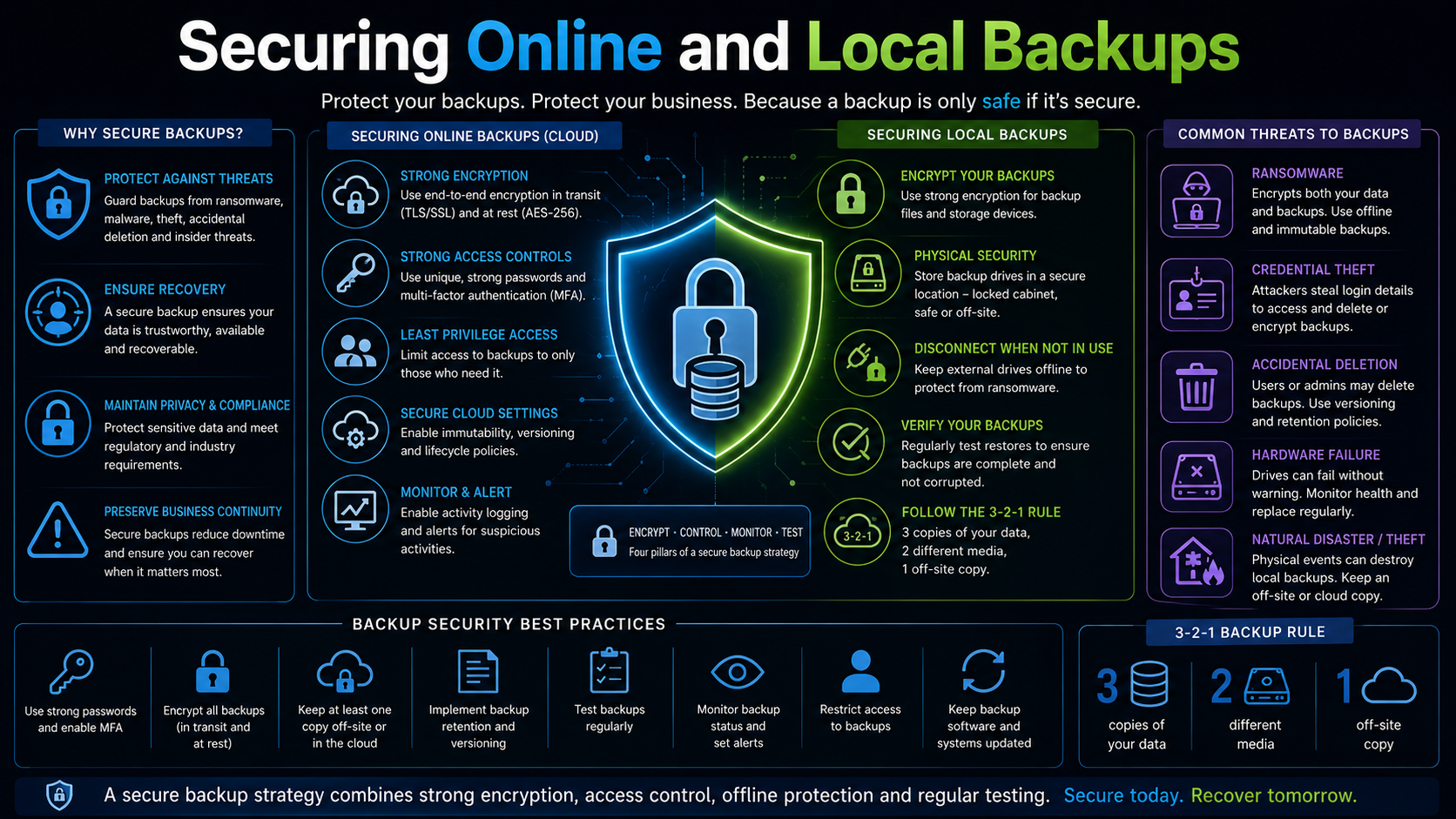
Securing Online and Local Backups from Ransomware and Hacking (TickTockIT)
A backup is only useful if it survives the same incident that made it necessary. Modern ransomware and targeted attacks increasingly search for and destroy backup copies before encrypting production data, specifically to remove the victim’s ability to recover without paying a ransom. Securing backups is no longer optional — it is a core part of backup strategy itself.
Having a backup is not the same as having a secure backup. A copy of data that an attacker can reach, modify, or delete provides little real protection, and in some cases gives a false sense of safety that delays a proper response until it is too late.
This page covers the practical steps used to harden both local and cloud-based backups against ransomware, insider threats, and external attackers.
Why Attackers Target Backups Directly
Early ransomware simply encrypted whatever files it could reach. Modern attacks are more deliberate. Once an attacker gains a foothold in a network, they often spend time identifying backup servers, storage repositories, and management consoles before triggering encryption.
The goal is to delete snapshots, disable backup jobs, revoke access, or encrypt the backup repository itself, so that the only way to recover data is to pay the ransom. This means backup infrastructure must be defended with the same seriousness as production systems, not treated as a secondary concern.
Separate Backup Credentials from Everyday Accounts
One of the most common ways attackers reach backup systems is through credentials that were never meant to protect them. If a backup console can be accessed using the same domain administrator account used for daily IT work, then compromising that one account compromises the backups as well.
Backup systems should use dedicated accounts that are not used for anything else, are not members of broad administrative groups, and are protected with multi-factor authentication. Where possible, backup management should be isolated from the general network domain entirely.
Immutable and Air-Gapped Backup Copies
Immutable storage locks backup data so that it cannot be modified, encrypted, or deleted for a defined retention period, even by an account with administrative rights. This directly defeats the most common ransomware tactic of deleting backup history before encrypting live systems.
An air-gapped copy goes a step further by keeping a version of the backup physically or logically disconnected from the network, such as a rotated external drive kept offline or a cloud copy with no standing network path back to production. If nothing can reach it, nothing can encrypt or delete it remotely.
A strong strategy typically combines both: immutable storage for fast, automated protection, and at least one air-gapped or offline copy as a last line of defence.
The 3-2-1-1-0 Rule
Building on the standard 3-2-1 backup rule, many security-focused strategies now add two further requirements:
- 1 immutable or offline copy — at least one backup copy that cannot be altered or deleted by a compromised account.
- 0 errors — backups are regularly tested and verified to restore with zero errors, so the protection is proven rather than assumed.
This extended model reflects the reality that redundancy alone is not enough if every copy is reachable from the same compromised network.
Network Segmentation for Backup Infrastructure
Backup servers and storage should sit on a separate network segment from general user and server traffic, with tightly controlled firewall rules limiting which systems can communicate with them and on which ports.
This limits an attacker’s ability to move laterally from a compromised workstation or server directly into the backup environment. Management interfaces for backup software should never be exposed directly to the internet.
Encryption of Backup Data
Backup archives should be encrypted both in transit, as data moves to local or cloud storage, and at rest, while stored on disk, tape, or in the cloud. Without encryption, a stolen backup drive or a compromised storage account hands an attacker a complete, readable copy of the organisation’s data.
Encryption keys should be managed separately from the backup data itself and protected with the same access controls used for other critical credentials, since a backup encrypted with a key stored alongside it offers little real protection.
Multi-Factor Authentication Everywhere
Every point of access to backup systems — management consoles, cloud storage portals, remote access tools, and administrative accounts — should require multi-factor authentication. Password-only access is one of the most common entry points used in attacks that ultimately reach backup infrastructure.
This applies equally to cloud backup providers. An attacker who compromises a single password to a cloud backup account without MFA in place can potentially delete every stored recovery point.
Securing Cloud-to-Cloud and SaaS Backups
Data stored in Microsoft 365, Google Workspace, and similar platforms is frequently protected by a separate cloud-to-cloud backup tool rather than the platform vendor’s own retention settings. That backup tool’s account is itself a high-value target, since it typically has broad read access across mailboxes, files, and Teams data.
Access to the backup platform should be restricted to as few administrators as possible, monitored for unusual activity such as mass export or deletion requests, and protected with conditional access policies where the platform supports them.
Role-Based Access and the Principle of Least Privilege
Not every IT staff member needs the ability to delete backup jobs, change retention settings, or purge historical recovery points. Backup platforms should be configured with role-based access so that day-to-day monitoring can be separated from destructive administrative actions.
Deletion and retention changes are especially sensitive operations and should be limited to a small number of trusted accounts, ideally with a second approval step or logged justification for significant changes.
Monitoring and Alerting for Suspicious Backup Activity
Backup platforms should generate alerts for events that are unusual in normal operation: mass deletion of recovery points, sudden changes to retention policy, disabled backup jobs, new administrative accounts, or login attempts from unfamiliar locations.
These signals are often an early warning that an attacker is preparing to disable recovery options before launching a wider attack, and catching them early can be the difference between a contained incident and a total loss of backup history.
Patch and Harden Backup Software Itself
Backup software and the servers it runs on are software like any other, and vulnerabilities in backup platforms have been directly exploited in real attacks. Backup infrastructure should be kept on supported, patched versions, with unnecessary services disabled and administrative interfaces restricted to specific management networks.
Vendor security advisories for backup products should be treated with the same urgency as advisories for firewalls or domain controllers, given how attractive backup systems are as a target.
Protecting Physical and Removable Media
Offline backups on external drives or tape are only secure if the media itself is protected. Drives should be encrypted so that a lost or stolen device does not expose data, stored in a locked location when not in use, and clearly labelled and tracked so that missing media is noticed quickly.
Rotation schedules should ensure that a reasonably recent offline copy always exists, without leaving media connected to a system for longer than necessary to complete the backup.
Testing Recovery in a Ransomware Scenario
Standard restore testing confirms that a backup can be recovered. Security-focused testing goes further by simulating a ransomware scenario: assuming the production network is compromised, and confirming that a clean recovery point can still be restored into an isolated environment without reintroducing the infection.
This includes verifying that restored systems are scanned before being reconnected to the network, and that the recovery process does not depend on infrastructure that may itself have been compromised in the same incident.
Incident Response and Backup Isolation
When a ransomware incident is detected, immediate isolation of backup systems from the rest of the network can prevent an in-progress attack from reaching remaining clean copies. This requires a documented incident response plan that specifically includes steps for protecting or disconnecting backup infrastructure early, rather than only focusing on the compromised production systems.
Staff should know in advance who has the authority to isolate backup systems and how to do so quickly, since hesitation during an active incident can be costly.
Common Security Gaps in Backup Environments
- Backup consoles accessible using the same credentials as general IT administration.
- No multi-factor authentication on backup software or cloud storage accounts.
- All backup copies reachable from the same network as production systems.
- No immutable or offline copy, leaving every recovery point vulnerable to deletion.
- Backup data stored unencrypted, especially on portable or removable media.
- No monitoring for mass deletion or unusual changes to backup jobs.
- Outdated, unpatched backup software exposed to unnecessary network access.
- Recovery testing that never accounts for a compromised or hostile network.
Building Security Into the Backup Strategy from the Start
Retrofitting security onto an existing backup system is possible but often more difficult than designing it in from the beginning. When planning or reviewing a backup strategy, security considerations — dedicated credentials, immutability, network isolation, encryption, and monitoring — should be treated as core requirements, not optional extras added after deployment.
This is particularly important for organisations subject to compliance or regulatory requirements, where the security of stored backup data is often assessed as closely as the security of live production systems.
Final Thoughts
Ransomware and targeted attacks increasingly treat backup destruction as a primary objective, not an afterthought. A backup strategy that assumes copies are automatically safe because they exist is no longer sufficient.
Dedicated credentials, multi-factor authentication, immutable and air-gapped copies, network segmentation, encryption, least-privilege access, active monitoring, and realistic recovery testing together form a defence that assumes an attacker may already be inside the network.
The measure of a secure backup is not whether it exists, but whether it would still be there, intact and restorable, after an attacker had already tried to destroy it.